Assembly Notes


Legal warning
Reverse Engineering software is often restricted and prohibited in the terms and conditions of proprietary software and under certain conditions it may even be illegal depending on the developers and distributors. You've been advised.
Difficulty: Hard
Operating System: Debian 13
Tools required:
- gdb
Knowledge required:
- Basic level programming (understanding even the least a piece of code)
- Average level hardware (knowing the components of a computer such as CPU, memory and so on)
- Basic level logical operations (knowing what "XOR", "OR" and "AND" operations are)
Note: This notes may be different in the future since i'll be updating the post whenever I gather more information about Assembly.
Welcome my dear hackers to my assembly notes/cheatsheet. Today we'll see how to interpret Assembly code with the final objective of being able to understand a program, the instructions it runs, and also the actions it performs. We're going to cover some old-school tools to make sure we understand the core of reverse engineering, and maybe in the future I'll cover some more powerfull tools such as Binary Ninja or x64dbg (tools really interesting and powerful, but I won't cover them in this post).
What is "Assembly"?
Assembly (ASM) is a low-level programming language that stands between the high-level code (C, C++, Java...) and machine code (binary) that helps to communicate directly with computer hardware. Nowadays it has no purpose as a programming language because (as you'll see) make the programmer want to rip his eyes. Working with high-level languajes such as C/C++ already makes the program really efficient, and though Assembly is even way faster than any other high-level language, the abstraction it requires to make a simple program makes it unfeasible.
Today, assembly is used in compilers to make assembly code out of high-level programs, which then is translated to machine code, but it is also used in devices that require maximum efficiency or need a high level of control over the hardware (such as some Arduinos and ESP32 devices). However, it is also useful in Reverse Engineering, where compiled binaries turn into machine code and because the machine code can be converted to CPU instructions, some programs are designed to convert those CPU instructions into Assembly code for us to read. That makes us more likely to understand the original code by reading the low-level code and thus programs with hidden code is now available for us.
This is useful when we're doing reverse engineering since we could potentially discover:
- Hidden passwords inside the code
- Potential vulnerabilities such as "Buffer Overflows"
- Malicious activity that could harm us or our system
So Reverse Engineering is really useful. Indeed, I was able to hack my professor's program designed to do exams without cheating using Reverse Engineering since I was able to discover inside the code a combination of keyboard keys that allowed me to bypass the security restrictions and thus cheat. If you're wondering, no, I didn't and haven't cheated any exam. I'm an ethical hacker with strong morals, but not someone harmless.
Understanding ASM syntax and architecture
After I've flexed about how useful reverse engineering is in cybersecurity over all, I'm going to talk a little about the different architectures in Assembly (from now on ASM) and the different architectures.
Assembly being a low level language must adapt to the hardware of the operating system. In high level languages such as C the code syntax doesn't change at all because it was thought to be more advanced and compatible than ASM, just to make the programmer's life easier. However, this doesn't apply to Assembly, because Assembly is thought to be the language that communicates with the CPU, it must adapt to the type of instruction the CPU runs.
Architectures
So when we often talk about Assembly, we must specify the architecture we're working with, because there are many differences. The two architectures I'll talk about in this tutorial are x86 (32 bits) and x86_64 (64 bits) architectures, since these are the most common nowadays and also are the ones that are able to run in my computer. There are many others, for example, two other famous architectures such as ARM32 (32 bits) and ARM64 (64 bits) that run in mobile phone devices (as well as many others), but I won't cover these.
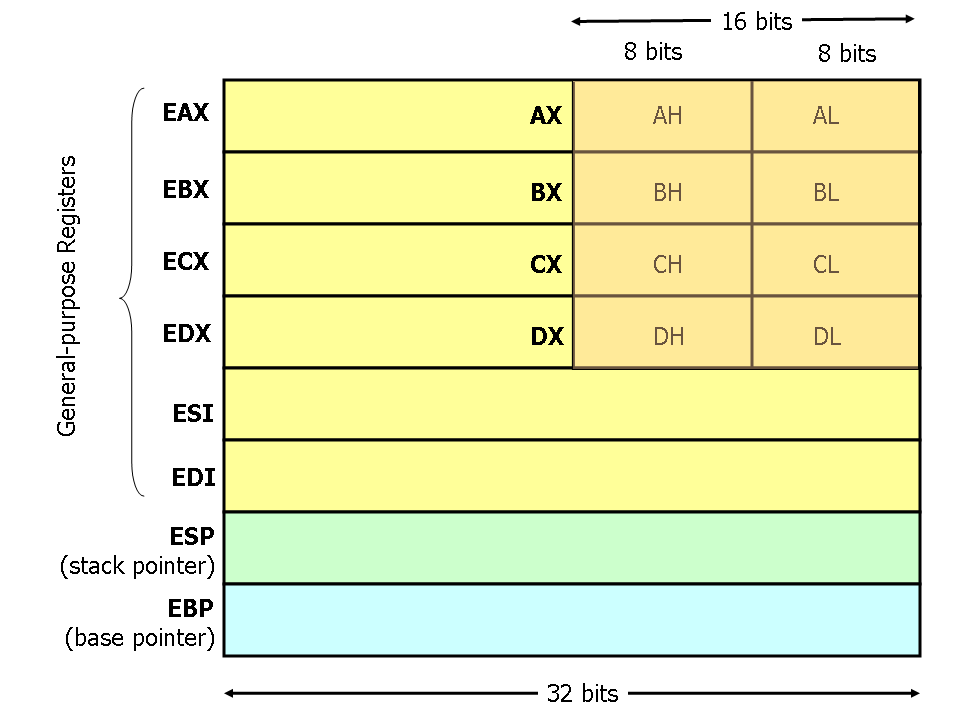
Nowadays (unless your computer is way too old) the most common architecture for computers is x86_64. If your computer is older than your father, then it may be using x86 architecture. This difference is important because it dictates how much information Assembly is dealing with in each operation. Assembly manages information using registers, which are small and super fast storage locations built directly inside the CPU, that hold data temporarily while the CPU is performing the instructions. When we talk about software logic, we can think of registers as variables that can hold data in our set of Assembly instructions. Depending on the architecture, registers may have some name or others. In x86 they begin with "e" and in x86_64 "they begin with "r".
You may see x86 registers as:
eax -> Accumulator (general arithmetic)
ebx -> Base register (general purpose)
ecx -> Counter (used in loops and shifts)
edx -> Data, also for input/output or multiplication/division
esi -> Source index (strings/memory copy, used along with "edi")
edi -> Destination index (general purpose)
esp -> Stack pointer (top of the stack)
ebp -> Base pointer (stack frame reference)
eip -> Instruction pointer (tells where the CPU is executing)
And also x86_64 registers as:
rax -> Accumulator (general arithmetic)
rbx -> Base register (general purpose)
rcx -> Counter (used in loops and shifts)
rdx -> Data, also for input/output or multiplication/division
rsi -> Source index (strings/memory copy)
rdi -> Destination index (general purpose)
rsp -> Stack pointer (top of the stack)
rbp -> Base pointer (stack frame reference)
rip -> Instruction pointer (tells where the CPU is executing, really important for hacking)
r8  -> General purpose (Used for function arguments)
r9  -> General purpose (Used for function arguments)
r10 -> General purpose (Volatile registers)
r11 -> General purpose (Volatile registers)
r12 -> General purpose (Non-volatile that often hold data across functions)
r13 -> General purpose (Non-volatile that often hold data across functions)
r14 -> General purpose (Non-volatile that often hold data across functions)
r15 -> General purpose (Non-volatile that often hold data across functions)
(Don't panic if you don't understand nothing. We'll cover this later. However, feel free to search this on the internet if you're seeing this post and I haven't posted the second part yet. I want to cover this in a really detailed way).
So as you can see, different architectures means not only different registers names, but new functionalities additions as well. Also, different architectures not only affect the way the Assembly code is written, it also affects memory. Having an x86 architecture will make your memory addresses look like this:
0x0040A1B8While an x86_64 looks like this:
0x00007FF6B3C42000Addresses in x86_64 are longer because this architecture is meant to deal with larger amounts of data, This is crucial to perform proper exploitation in binaries, since performing the same Buffer Overflow (e.g.) in an x32 architecture will result in totally different scenarios in x86_64. The memory address that you're supposed to exploit when performing a Buffer Overflow is way smaller in x86 architectures than in x86_64, so the same exploit wouldn't work in different architectures. This is one of the reasons why it is important to distinguish between them and know the peculiarities amongst them.
Syntax
The same assembly architectures can be written using different types of syntax. While in C the code is always written the same (e.g. "printf" function will always be written "printf()"), the same assembly instructions can be written in different types of syntax and be valid for the same architecture and even the same program. When speaking of assembly, there are 2 main syntax that are still popular nowadays.
AT&T
The default syntax most programs use (such as "gdb" or "objdump", even some more advanced tools like "binary-ninja"). It can be hard to interpret at first, but being honest, all assembly code is hard to interpret. In this tutorial I'll be covering this syntax just because is the one you'll see the most on videos on Youtube, so that you can have more places to research more information about this programing language.
An instruction that inserts data into a register in assembly written with the AT&T syntax would be something like this:
mov $5, %raxThis means we're copying the value "5" into the "rax" register. In AT&T the "$" symbol means it is a constant literal value (in this case "5") and the "%" symbol means we're talking about a register (in this case, "rax"). There are many more differences, but the main difference is AT&T notifies you about what we're interacting with in a form of symbols, and the next syntax we'll talk about, doesn't.
Intel
Intel syntax is easier to understand by most of hackers out there because of it's simplicity representing the same information as the AT&T syntax. This is why mane hackers out there prefer it over AT&T, and it is covered even in Jon Erickson's book"Hacking: The Art Of Exploitation", but since I've seen AT&T syntax in most software examples, I'll stick to that.
An instruction that inserts data into a register in assembly written with the Intel syntax would be something like this:
mov rax, 5As you can see, in the AT&T representation the first keyword of the instruction ("$5") is the source data that we'll move and the second keyword ("%rax") is the destination of that data. In Intel's syntax, is the opposite. The first keyword is the destination and the second the value we'll move.
The Stack
The stack is a data structure that is stored inside the RAM. The stack structure is used by all types of software to store data and follows the LIFO principle. The last data inside the stack will as well be the first to be removed.
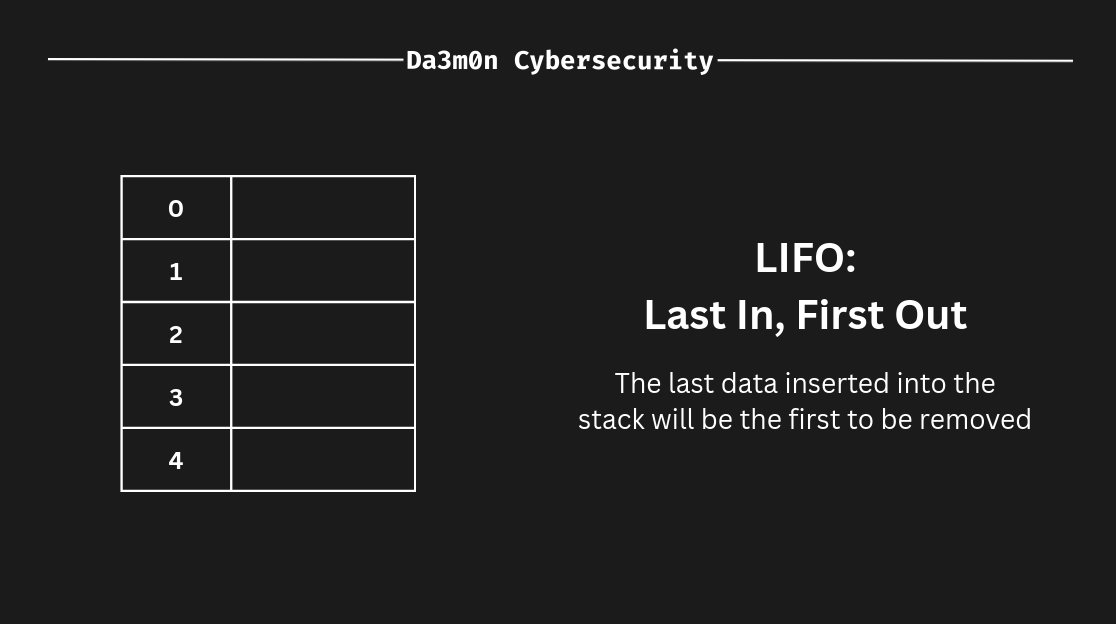
To better represent this, let's put an example.The position closer to 0 inside the stack (the table I've put in this representation) would be the one on the top. Imagine I have these two ASM instructions:
mov $42, %rax
push %rax
In this case, the data would be inserting (push) in the bottom of the stack. In this case, in the address "4".
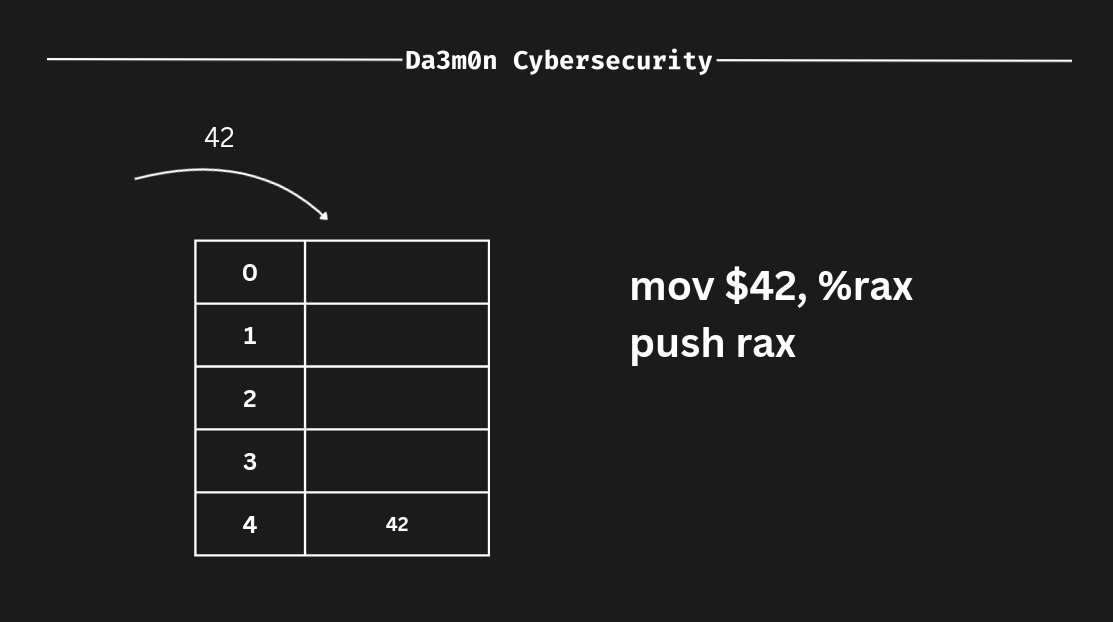
Because ASM follows the LIFO principle, the value we just inserted gets pushed to the bottom of the stack. Let's represent another push in order to understand better how the stack works.
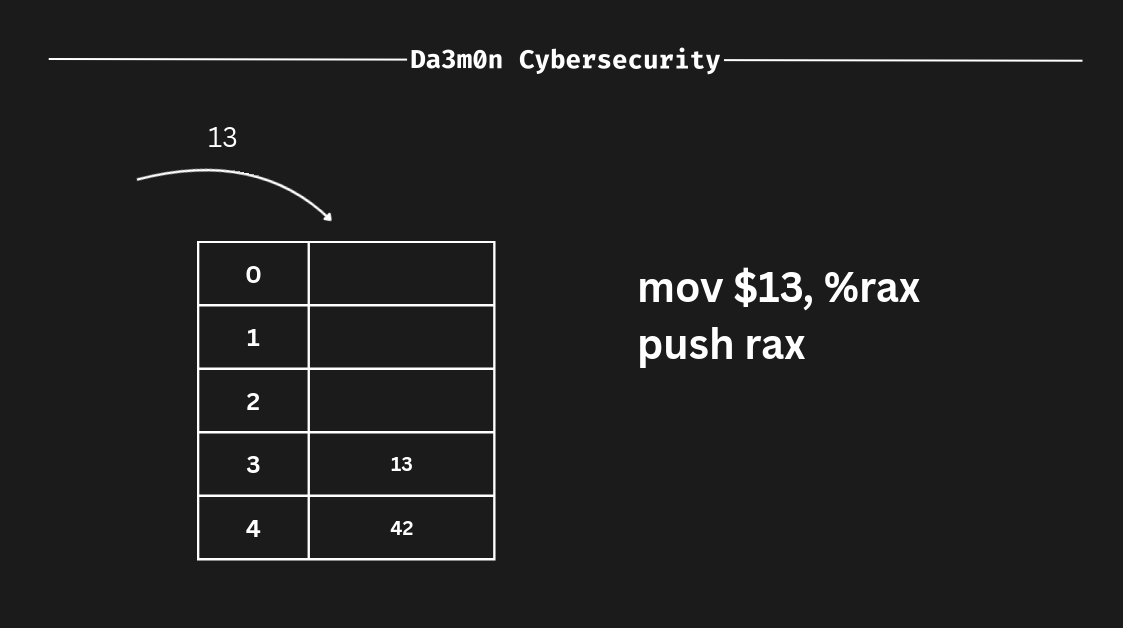
As we can see, though I've changed the value "rax" contains by "moving" the literal value "13" into the "rax" register, inside the stack the last data we inserted keeps it's value (the address 4 still contains the value "42", even though the register value has changed. This is because the stack is a representation of memory addresses, and the registers are storage units inside the CPU).
Now, what happens if we remove data from the stack? Well, as we told before, the stack follows the LIFO principle, so in this case, the last data inserted inside the stack would be the first to come out of it. In this case, we've put "13" as the last input, so in this case, it would be "13" the one we'd remove from the stack (since it has been the last value we inserted, it is the first value to be removed. That's LIFO).
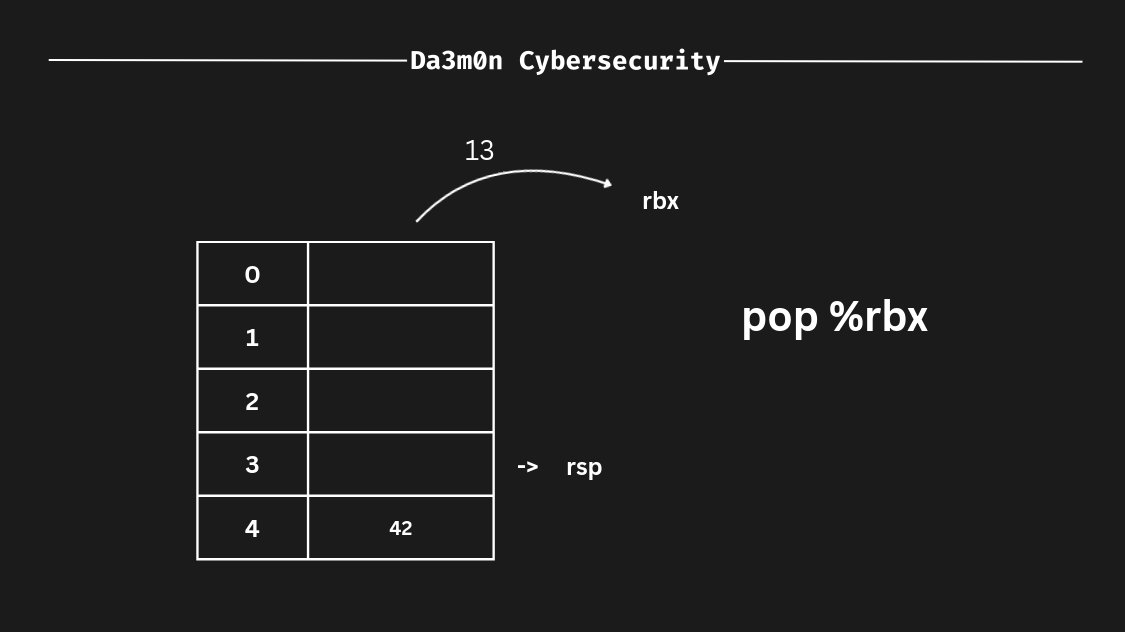
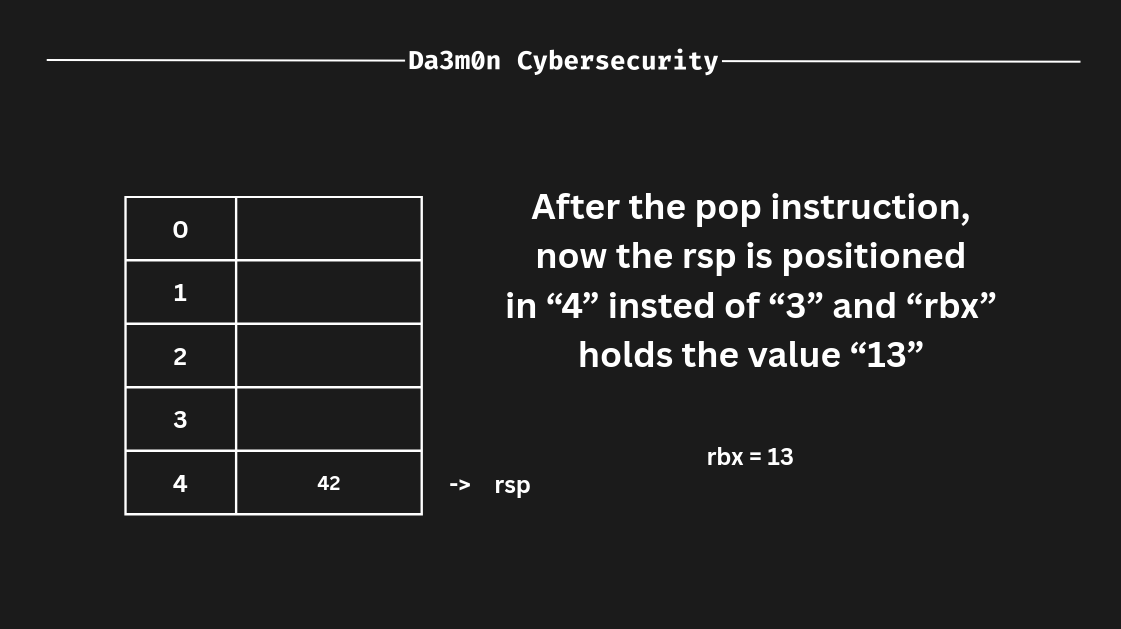
In this case, following the LIFO principle (i really want this to stick into your mind) if we remove some value from the stack (this can be done using the "pop" instruction) it works as follows. First, the register that follows the pop instruction defines where we'll save the value. Then, the "rsp" (stack pointer, which means "the top of the stack") value is assigned to the register we've specified in the "pop" instruction, and afterwards, the "rsp" remains empty, as shown before. After the operation has finished, since we've poped the address 3 on the stack, now the "rsp" would be 4 instead of 3 (one address below from the previous stack pointer, "rsp").
Instructions
In ASM (Assembly), instructions are the equivalent of the actions the program can perform in order to achieve a certain outcome. For example, a set of instructions could calculate the square of a specific number and save it inside the stack. We have previously seen 3 instructions called "mov", "push" and "pop", but in ASM, there are many others to considerate, but in this part of the lesson, we'll dive into some instructions I consider essential to understand.
mov
The "mov" instruction, essentially, copies the value from the source to the destination. To put it into perspective, if we have "50" as the source and "rax" as the destination (you'll see "rax" is used really often), now "rax" would store the value "50". If we assigned again "rax" to "rbx" using a mov instruction, now "rax" as well as "rbx" would sotre the value "50".
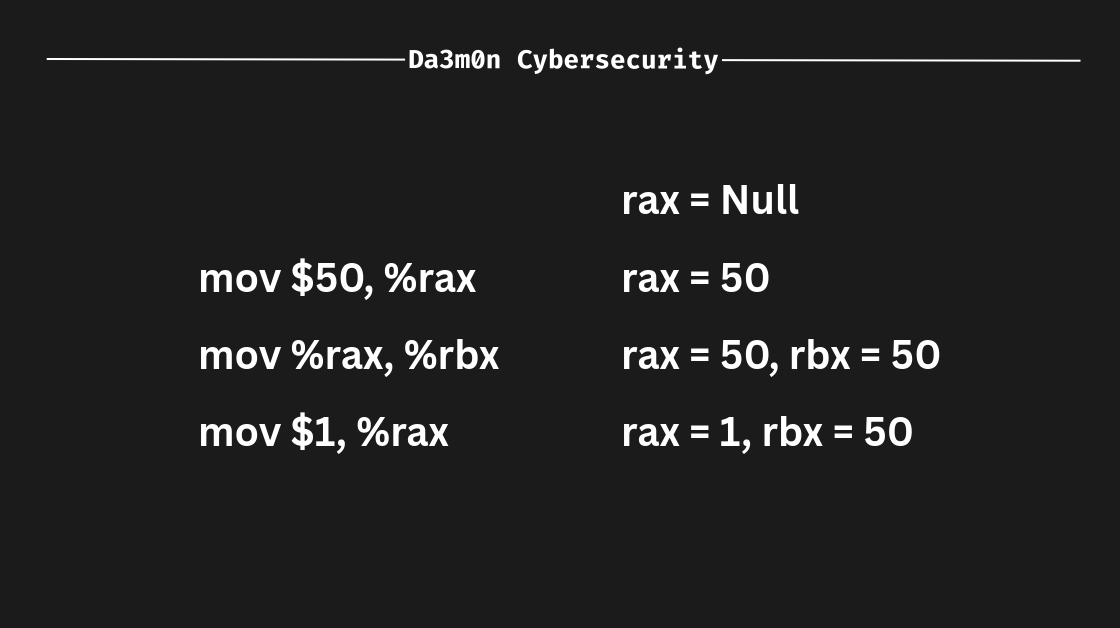
Also, "mov" can be used for many other operations, such as copying values not only from registers but from memory addresses using pointers, but those operations require C knowledge, which isn't contemplated in this lesson, so I'll skip that information. However, if you want to know more about this topic, you can investigate in the "References" part of this post.
lea
"lea" instruction took me a little to understand, but it's quite simple (only if you're familiar with pointers and memory). "lea" can be seen similar to "mov", because the syntax is really alike. However, it is a complete different world. the "lea" instruction only calculates the memory address which a value would be assigned. To put it into perspective, imagine we have the following instructions:
mov $20, %rax
lea (%rax), %rbx
In this case, we're specifying we want to calculate the address of "rax" and store it inside "rbx". In this case, it would be equivalent to do this:
mov $20, %rax
mov %rax, %rbx
Since because we're storing the position of "rax" inside of "rbx", and "rax" stores the number "20" inside the register, "rbx" is therefore equivalent to "20". Explained in a more graphic way, this is what I'm talking about:
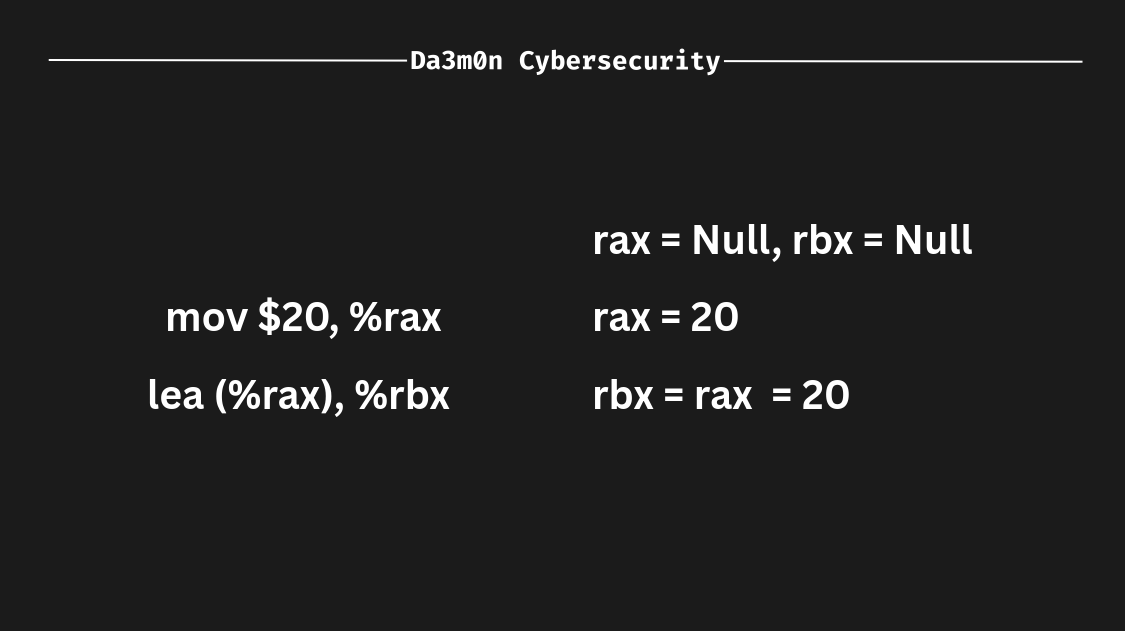
Since "rbx" would store the calculated address for "rax" alone (therefore there is nothing to calculate because I'm only specifying I want to operate only with "rax"), "rbx" would be equal to the value that contains "rax". However, this is not the use case for the "lea" instruction. Actually, this instruction is really common in today's CPUs since it allows for arithmetic operations. The real use for "lea" would be someth-ing like this:
lea displacement(source, index, scale), destination

displacement -> Optional spaces in memory that the register is going to move (either 0 or a positive/negative number)
source -> The source register for the arithmetic operation (%rax, %rbx...)
index -> Optional register to multiply by the scale
scale -> Multiplier that applies to the index
destination -> Register where the address will be saved
This would be a realistic "lea" instruction:
lea 8(%rax), %rbxWhat this does is, it obtains the memory address of "%rax" and then moves %rbx the times we specified in the displacement (in this case, 8). To better represent this example, let's take a look here. Imagine I have this memory address:
0x0000000000000001

(This can be interpreted as "0x1")
Now, 0x1 is the address of "rax". If we executed the "lea" instruction we've seen before, "rbx" would be in this memory address:
0x0000000000000009

(This can also be interpreted as "0x9")
Because we've shifted the memory address 8 spaces. But a more complex operation would look something like this:
lea 10(%rax, %rcx, 2), %rbxadd
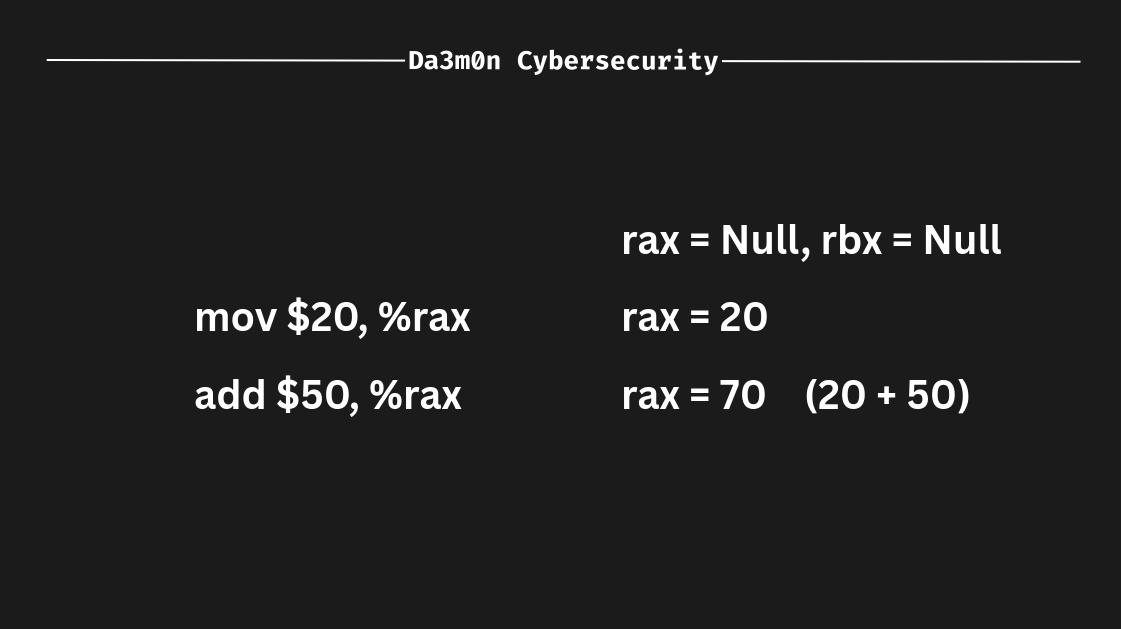
The "add" instruction sums the value of the source to the destination. In this example, if I have "50" and I want to sum 50 to "rax" (which stores the value 20), then the operation would be:
50 + 20 = 70Which would make "rax" store the value 70.
sub
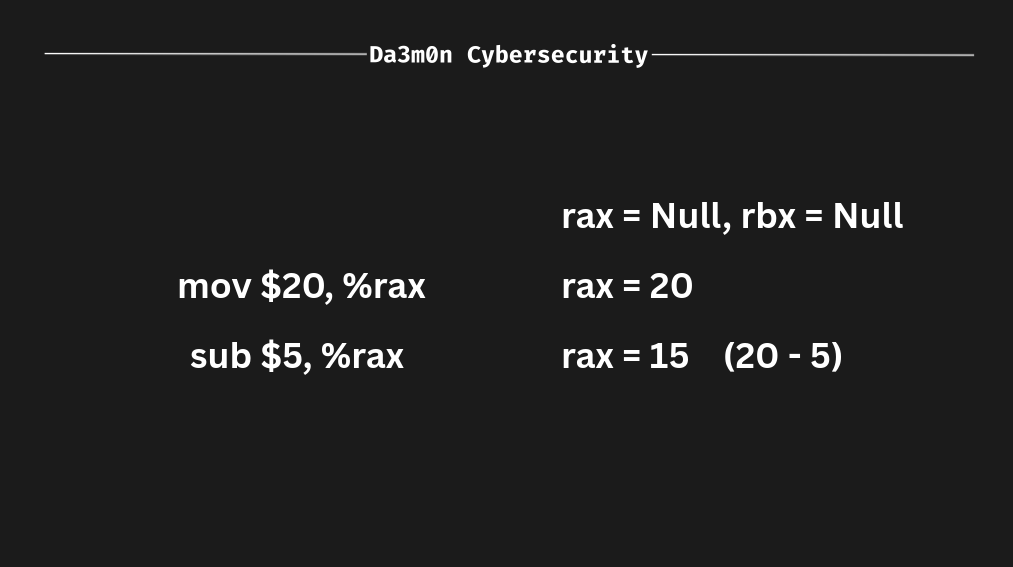
The name "sub" comes from "subtract", which is exactly what this instruction does. Is the opposite of the "add" instruction. It subtracts the source from the destination, as seen below.
The Memory
When talking about Assembly, memory is not only one of the most important element, but it is as well a crucial part of the language (and the whole device, of course). Assembly is really related to memory because it works in such a low-level that needs to specify memory addresses (kind of like C, but way more specific. You'll see).
Memory is divided in what's called "addresses". We can think of a memory address as a very little region inside the memory that holds data. Depending on the system's architecture, the memory address can vary, therefore changing the way software interacts with memory addresses. We've seen previously an example of an x86_64 memory address, however, for the sake of proper understanding, I'll put the example again to refresh your mind after this amount of information.
0x00007FF6B3C42000And inside each region we can store a certain amount of data. Depending on the debugger, the same memory address can display (not contain, it's just the format of the application that displays the information that way) completely different amounts per address as we've talked Also, information is interpreted in hexadecimal for a better understanding of what the address contains.
For this example I'll leave here a script that writes the string "Da3m0n" directly into your memory inside a region of 32 bytes (for both linux and windows systems) so you can see how it's stored.
#include <stdio.h>
#include <stdlib.h>
#include <string.h>

int main() {
	void* pMemoryAdddress = malloc(32);
	printf("[+] Base memory address: %p\n", pMemoryAdddress);

	char string[8] = "Da3m0n";
	memcpy(pMemoryAdddress, string, sizeof(string));
	printf("[+] String '%s' copied to the base memory address\n\n", string);

	free(pMemoryAdddress);

	printf("Press any key to exit...\n");
	getchar();

	return 0;
}
You can compile the code using "GCC" (GNU C Compiler) with the following command:
gcc allocate_memory.c -o allocate_memoryWhenever the code is compiled and the binary is executed, it'll output the memory address where the string "Da3m0n" is located, just like this:
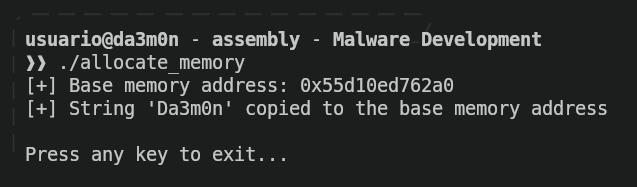
The program will end it's execution once a key is pressed. If we want to verify the string has been stored inside that memory address, we can use "GDB" (GNU Debugger), that will serve as tool to check the program's execution and check whether is where is supposed. To do so, we'll just execute the following command and enter the console:
gdb allocate_memory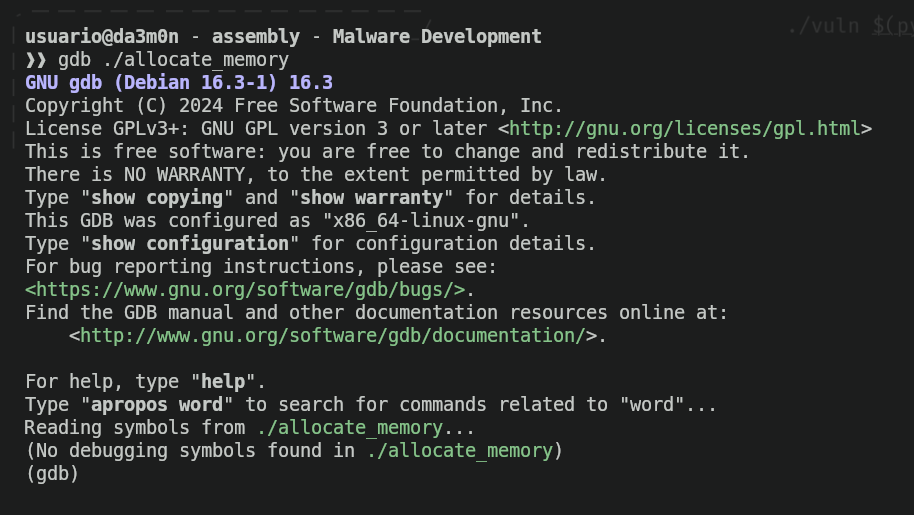
Now that we're inside GDB console, we can use different commands to begin the debugging. First of all, we have to take into account that the script erases the string that we've put inside the memory (because we've used the "free" function) shortly before it tells us to press any key. Therefore, if we want to really see the value that's inside the memory address, we'll need to stop the execution before it happens. For that, we'll use the command "break" (which stands for "breakpoint") that will allow us to stop the execution at a certain assembly instruction.
In order to specify a breakpoint we'll need the memory address where the instruction is (to tell GDB to stop the execution once the execution flow arrives to that point). For that, we'll use the command "disas main".
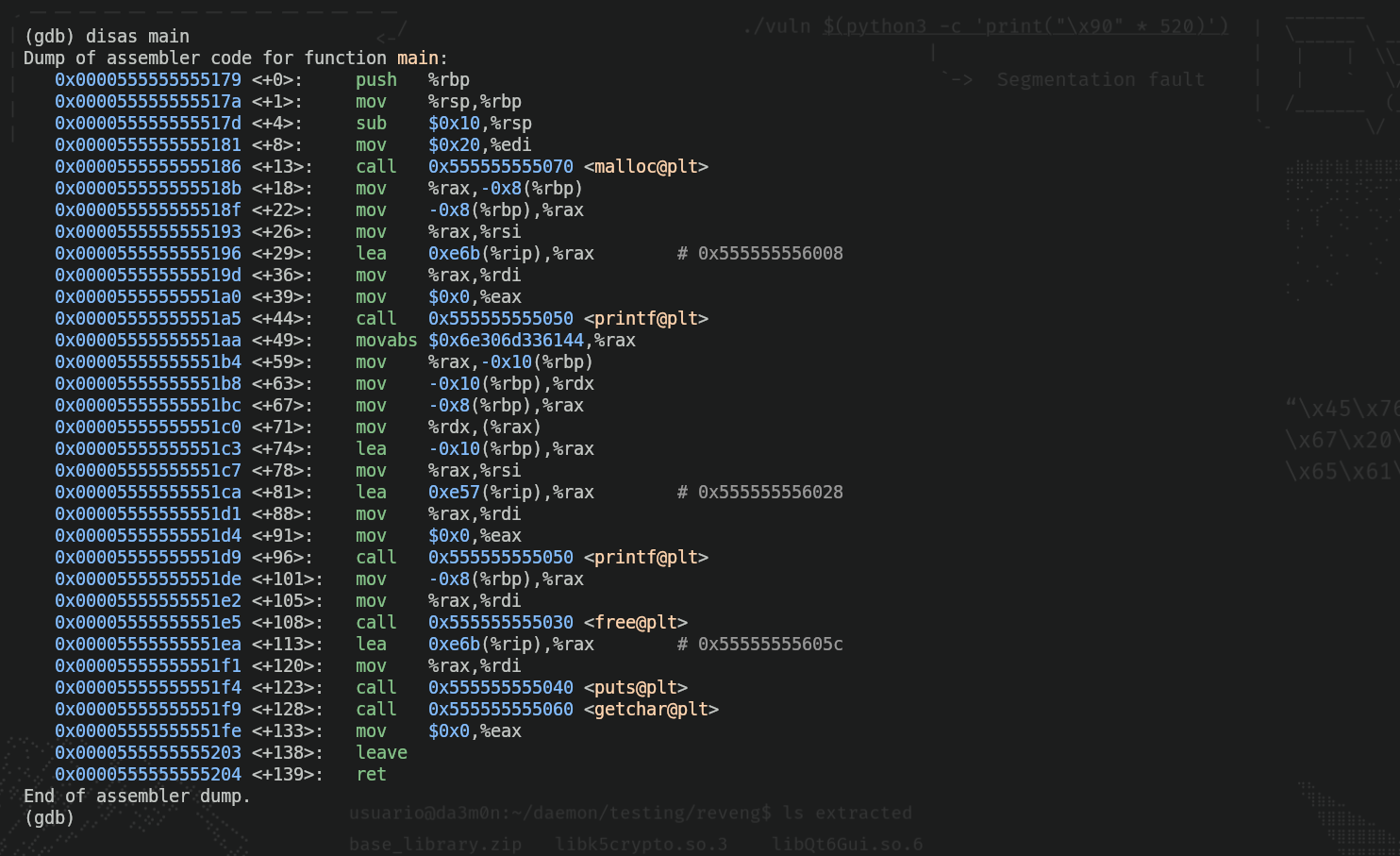
As we can see, inside all those instructions (don't worry if you don't understand them all, it's good for now) there is an instruction that contains the word "free"(free@plt). That's the part when the program erases the memory we've allocated for that string, so before that instruction, we'll put a breakpoint (the "*" is used to tell GDB we'll assign a breakpoint to a memory address).
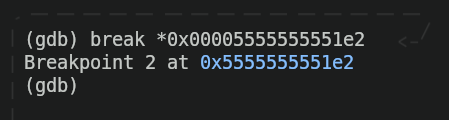
Now we'll run the program and we'll check that, indeed, the program stops right before putting the message "Press any key to exit..."
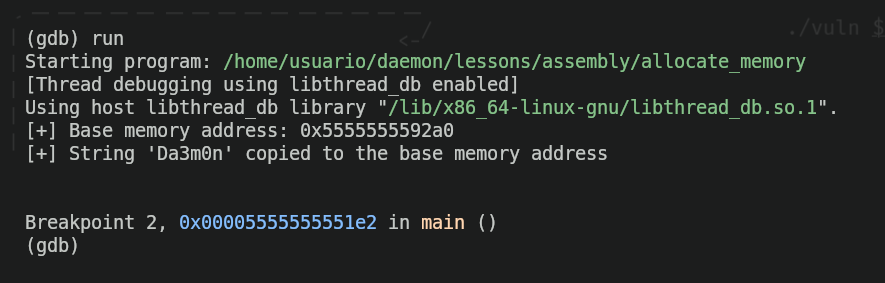
Now, we'll check if the string "Da3m0n" is really inside the memory address "0x5555555592a0" as the program says. For that, we'll use the following command:
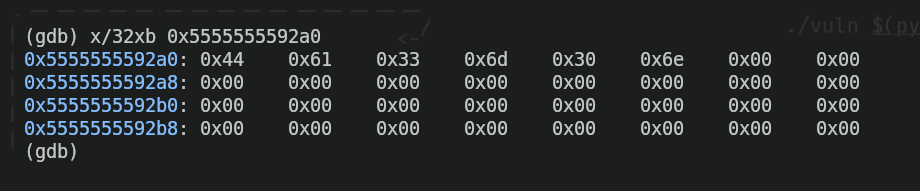
We can see we got a set of hexadecimal values inside the address ,along with a lot of zeros. I'll explain why this is what we were expecting and why this makes sense first of all:
xin GDB is an abbreviation of "examine". The command "examine" is used, indeed, to examine what's inside memory./is the separator that indicates we want to specify some filters and formats when examining memory, and the "32xb" that follows are the filter and the formats.32means we want to output the 32 bytes of memory (1 byte equals to "0xFF" in hexadecimal) that come after the specified memory address.xbmeans I want to output the memory information in hexadecimal (the "x") and the data inside the memory address must be formatted in bytes (the "b"). That's why each byte is separated from the one that follows it.
We can also see that we have a bunch of zeros. That's because when writing the program I specified the quantity of bytes I wanted to reserve in memory (in this case I specified 32, and if you count every byte in the output shown above, indeed there's 32 bytes), and there are some bytes of those 32 (the ones in the beginning of the address) that are filled with hexadecimal values. Each of those values is a letter of the string I specified inside the code ("Da3m0n"), so the "D" in hexadecimal would be "0x44", the "a" would be "0x61", and so on. To check this is real and I'm not lying, we can use the command xxd to see the literal translation of those hexadecimal values.

And as we've seen, the we've successfully reviewed the command execution and verified it works properly.
References